How To Watch & Shop

Welcome to Craft TV, the home of live crafting inspiration from Highlight Crafts. Whether you’re tuning in for creative demonstrations, discovering exciting new products, or joining our vibrant crafting community, we’ve made it easy to watch, shop, and interact with every live show.

It couldn’t be easier to join in, but if you’re new to us or need a refresher, you’ll find everything you need on this page. From where to watch live broadcasts and catch up on past shows, to how to shop featured products and engage with our presenters in real time, follow the guides below and get ready to enjoy hours of creativity, inspiration, and exclusive crafting offers with Craft TV Live.

Where are you watching us?

Watching & Shopping

You can watch all our live shows and catch up on previous broadcasts right here on our website, whenever it suits you.

To view all available shows, click Craft TV in the main menu at the top of the page.

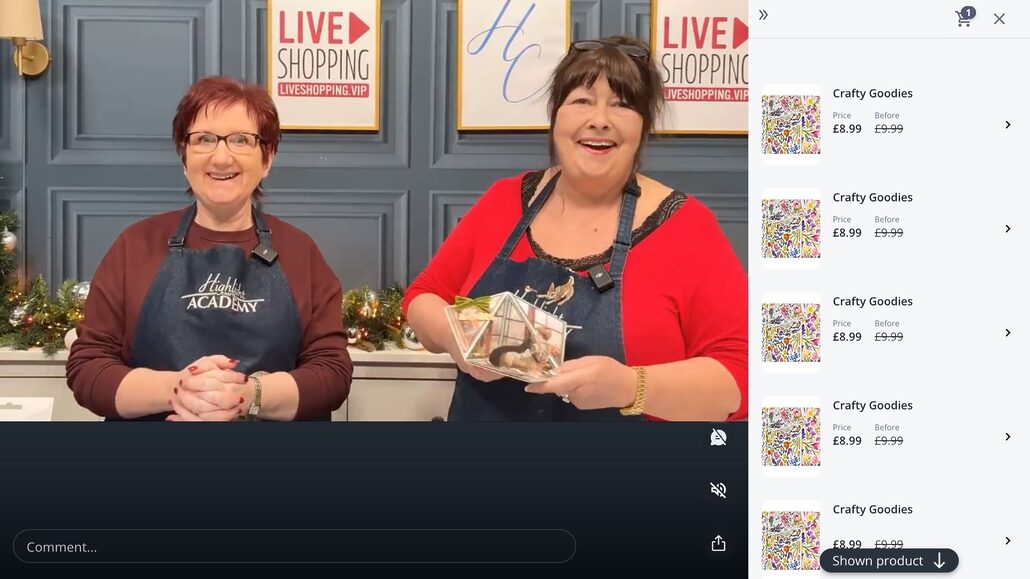
Select either the live show featured at the top of the screen or choose one of our previous shows from the listings. You’ll then see a screen similar to the example shown on the left.

A complete list of products featured in the show will be displayed alongside the video. The product currently being demonstrated will be highlighted for easy reference.

Click on any product to view more details and add it directly to your basket using the Add to Basket button.

Once you’ve added items to your basket, a shopping bag icon will appear at the top of the screen. Click this at any time to review or update your basket, or proceed to checkout when you’re ready. You can continue browsing and add more items from elsewhere on the website at any stage.

Commenting

If you’d like to join the conversation during a live show, simply type your message into the Comment box at the bottom of the screen.

The first time you comment, or if you haven’t visited for a while, you’ll be asked to choose a display name. This name will be visible to other viewers on the website and to the team in the studio.

Once set, you can change this at any time by clicking the person icon next to the Comment box and choosing the Edit details option.

Please be aware you can only comment on shows whilst they’re live – if you’re watching back, the option to comment is disabled.

If you’re watching in landscape mode on your phone, you may see the full screen experience – see the computer or tablet tab above.

Watching & Shopping

You can watch all our live shows and catch up on previous broadcasts right here on our website, whenever it suits you.

To view all available shows, click Craft TV in the main menu at the top of the page.

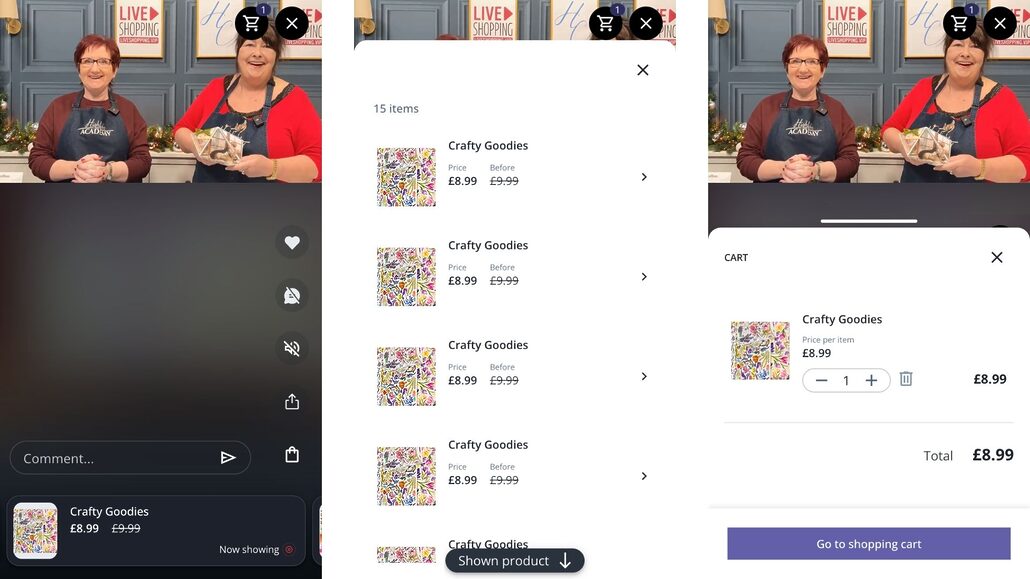
Select either the live show featured at the top of the screen or choose one of our previous shows from the listings. You’ll then see screens similar to the examples shown on the left.

The product currently being demonstrated will be shown at the bottom of the screen for easy reference, or you can click the bag icon at the bottom-right to see a full list of the show’s products.

Click on any product to view more details and add it directly to your basket using the Add to Basket button.

Once you’ve added items to your basket, a shopping bag icon will appear at the top of the screen. Click this at any time to review or update your basket, or proceed to checkout when you’re ready. You can continue browsing and add more items from elsewhere on the website at any stage.

Commenting

If you’d like to join the conversation during a live show, simply type your message into the Comment box at the bottom of the screen.

The first time you comment, or if you haven’t visited for a while, you’ll be asked to choose a display name. This name will be visible to other viewers on the website and to the team in the studio.

Once set, you can change this at any time by clicking the person icon next to the Comment box and choosing the Edit details option.

Please be aware you can only comment on shows whilst they’re live – if you’re watching back, the option to comment is disabled.

Watching & Shopping

You can watch all our live shows and catch up on recent broadcasts directly from our Facebook page, whenever it suits you.

When we’re live, you’ll see a notification at the top of the page and can jump straight into the current show. You can also select the Live tab to browse our previous broadcasts and watch them back at any time. Simply click on the show you’d like to watch to get started.

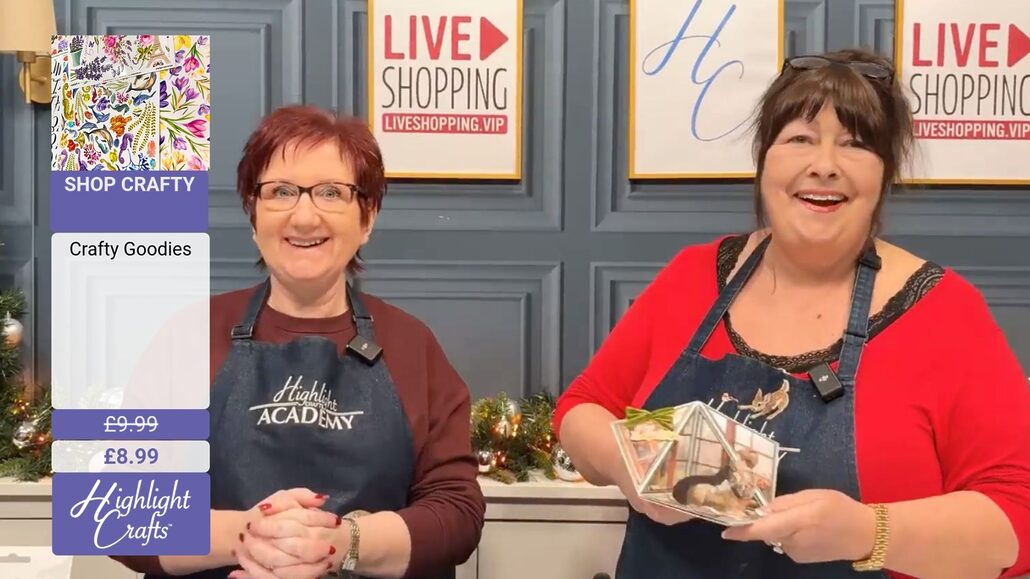
Shopping while you watch couldn’t be easier. Throughout each show, products will be assigned a unique Shop Code, which the presenter will mention on air and display on screen, as shown in the example opposite. To add a product to your basket, simply comment Shop followed by the product code in the comments section.

Once you’ve commented, you’ll automatically receive a message in Facebook Messenger containing a link to the product. You can continue shopping throughout the show, and when you’re ready to check out, simply click the link from any of the products you’ve selected (provided they’re from the same show). You’ll be taken directly to our website with your chosen items already waiting in your basket.

Before completing your purchase, you’re welcome to review your basket, make changes to quantities, remove items, or add additional products from elsewhere on the website.

Commenting

Want to join the conversation? Simply type your message into the comments section beneath the video during any live show.

We love hearing from our viewers and will do our best to answer questions and respond to comments during the broadcast. Please note that comments left on previous shows may not always be monitored. If you need assistance, we recommend sending us a direct message on Facebook or visiting our Contact Us page for other ways to get in touch.

Watching & Shopping

You can also watch all our live shows on our Instagram profile.

When we’re live, you’ll see a notification at the top of the page and can jump straight into the current show.

Shopping while you watch couldn’t be easier. Throughout each show, products will be assigned a unique Shop Code, which the presenter will mention on air and display on screen, as shown in the example opposite. To add a product to your basket, simply comment Shop followed by the product code in the comments section.

Once you’ve commented, you’ll automatically receive a message in your Instagram Inbox containing a link to the product. You can continue shopping throughout the show, and when you’re ready to check out, simply click the link from any of the products you’ve selected (provided they’re from the same show). You’ll be taken directly to our website with your chosen items already waiting in your basket.

Before completing your purchase, you’re welcome to review your basket, make changes to quantities, remove items, or add additional products from elsewhere on the website.

Commenting

Want to join the conversation? Simply type your message into the comments section beneath the video during any live show.

We love hearing from our viewers and will do our best to answer questions and respond to comments during the broadcast. If for any reason we don’t, we recommend sending us a direct message on Instagram or visiting our Contact Us page for other ways to get in touch.

Watching & Shopping

You can watch all our live shows and catch up on previous broadcasts through our YouTube channel, making it easy to enjoy Craft TV on your TV, tablet, mobile, or any device with YouTube access.

Simply search for Highlight Crafts on YouTube and visit our channel, where you’ll find our latest live shows as well as a library of past broadcasts. Just select the video you’d like to watch and start enjoying the show.

While YouTube doesn’t currently support our interactive shopping features, there are still plenty of ways to shop along. You can shop using our website, Facebook, or Instagram broadcasts, or visit our Today’s Offers page to browse all of the featured products from today’s shows.

Commenting

Unfortunately, we’re unable to offer live commenting and interaction through YouTube in the same way as our other platforms.

If you’d like to ask questions, chat with our presenters, or join the conversation, we recommend watching via our website, Facebook, or Instagram, where you can interact with us and other crafters during the shows.

Frequently Asked Questions

Want to keep up with all our live Craft TV shows? The easiest way is to subscribe to our newsletter. We’ll send you a daily email packed with details of the day’s upcoming shows, so you’ll always know what’s coming up and when to tune in.

If you’re watching on Facebook or Instagram, you can also receive live show reminders directly through social media. Simply comment LIVE on any of our broadcasts, then follow the prompts in the message you receive to confirm you’d like reminders. Once subscribed, we’ll send you a notification and direct link whenever we go live, making it even easier to join the show.

You can unsubscribe from both email updates and live show reminders at any time.

You’ll often hear us mention Club Highlight and exclusive member pricing during our Craft TV shows. The great news is that Club Highlight is completely free to join, and if you have a Highlight Crafts account, you’re already a member.

As a Club Highlight member, you’ll automatically receive 5% off most products across the website, with even greater discounts available as you spend more with us. You’ll also earn 5 reward points for every £1 spent, with each point worth 1p to redeem against future orders.

To make sure you receive your member discounts, earn points, and enjoy all your Club Highlight benefits, simply log in to your account before checking out.

To learn more about the benefits of membership, visit our Club Highlight page.

If you’re shopping whilst watching on our website, any products you add from different shows will automatically be combined into a single basket, making checkout quick and easy.

If you’re shopping via Facebook or Instagram, products can only be purchased from one show at a time. When you proceed to checkout, you’ll only see the items featured in the show you’ve selected. This helps prevent any unwanted items from previous sessions being included in your order.

You can still browse our website at any time and add additional products to your basket separately.

Special offer prices shown during our programmes are usually available on the day of broadcast and the following day, until 11:59pm (UK time), unless stated otherwise. Certain offers may appear in later shows and be available for an extended period. All offers are subject to availability while stocks last.

Unfortunately, an item is not reserved until you complete your purchase. For popular products, there may be more customers with the item in their baskets than there is stock available. Even if an item is in your basket, other customers can still purchase it, which may result in it becoming out of stock before you complete your order.

Privacy Overview

This website uses cookies so that we can provide you with the best user experience possible. Cookie information is stored in your browser and performs functions such as recognising you when you return to our website and helping our team to understand which sections of the website you find most interesting and useful.